
All-
The CMiC Migration is finalized. Please do the following on your computers to ensure successful access.
This is mandatory for CMiC to function properly using Internet Explorer.
To add new URL to Trusted Sites for Internet Explorer:
-Open Internet Explorer
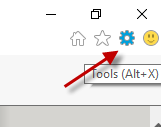
-Click Tools
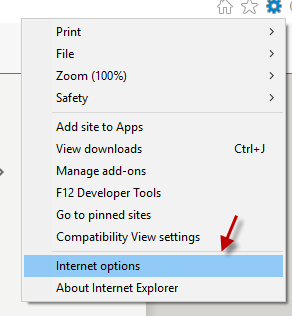
-Click Internet options
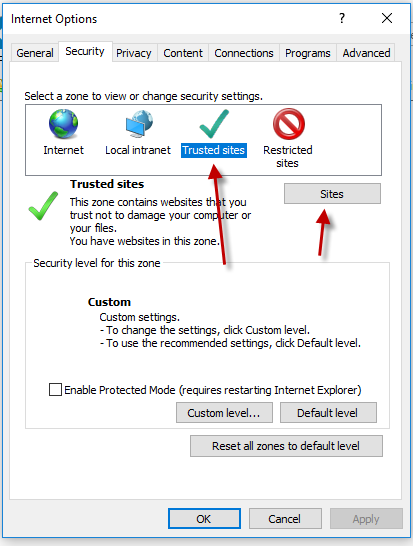
-Select Trusted Sites and then click Sites
Enter https://*.cmicglobal.com in the white box for Add this website to the zone: and click Add
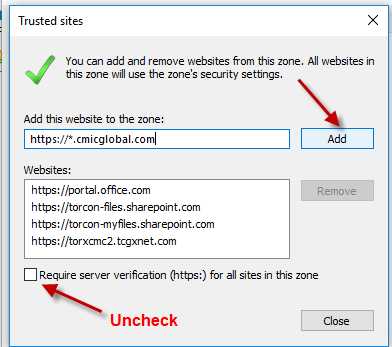
Click Close and OK and OK to get back to the main page.
New CMiC Link:
Please make sure you DELETE the old link in your favorites. It will no longer work.
The Launch Page will look different. Please Choose Enterprise Classic, Production and then click RUN Software >>
You will login with current username and password from the old CMiC environment. If you do not remember your password or have others issues accessing the system, please enter a support ticket.
Support will be available from 6AM Monday 11/27.
You can enter a ticket by going to https://support.torcon.com or by emailing support@torcon.com
Comments
0 comments
Please sign in to leave a comment.